SING KING KARAOKE - INCREASING CONTENT OUTPUT BY 500%

Summary
During my time at Sing King Karaoke, we defined and built a bespoke piece of software to create Karaoke video content with industry leading word timings, which we called the Content Production Tool (or CPT for short), that has had a substantial impact on business growth, productivity and output.
This has been achieved by:
- Identifying the pain points in the current software. Analysing user feedback from questionnaires and in-person interviews.
- Defining the problems and creating solid hypotheses. This helps to focus on the problem at hand, and it’s great to avoid scope creep. Great to define a robust MVP.
- Exploring and testing solutions with real users. Concept testing and usability testing to answer the two vital questions: Is this useful? and Does this solve the problem?
The Problem
After conducting user research and interviews with our content creation team, I analysed the data collected and found the most commonly mentioned things were the steep learning curve of After Effects (the software currently used by the team) and also the inability to do all required tasks in one place.
Defining a potential solution
Defining the solution to this problem involved researching other content creation tools which could be used to create these Karaoke videos in 4K and also log the most accurate word timings for the Karaoke sweep.
The solution would be to create a “one-stop-shop” for content creators with little to no barrier to entry.
Currently the content team would use three different softwares to create one video, taking approximately 7 hours. The software used was Lyric Genius for lyric formatting and editing, Akarii for creating the work timings and Adobe After Effects to create the final piece of content.
UI Exploration
After dealing with the user journey in the workflow, I began creating some initial MVP designs to present to stakeholders and also gain a rough t-shirt sizing from our developers for how long this would take. The designs focused on making the user experience as seamless as possible with very little room for user error in creating these files.
The first part of the process is inputting lyrics in the correct format to so that they are displayed correctly in the Karaoke video. In the past, this process involved manually editing a text file without the option to see what the finished content would look like until the very end. This meant that if any errors were made in the text editing stage, they would not be picked up until the project was in it’s final stages - at which point the content producer would have to start from the beginning again as there was no way to edit text after it had been inputted and processed by the time stamp creation software.
The solution to this was to have an open ended text editing option which could be accessed at any point during the work flow and changes would be live and appear in the preview window for the creator to see.
Text is inserted into the project by pasting directly in and then, the CPT then formats the text to pre-set parameters (4 line per verse, with specific limits on line length and line breaks). User can then go in manually and change anything which does not fit.

The next stage involves adding the timings for the words so that the Karaoke sweep is in perfect timing to the backing track. This is done by entering the time stamp setting tool, and then using the space bar to log the beginning of each word. The user does this by listening to the backing track with added vocal track on top to set the word timings.
On this screen, we can see that work timings are inputted every time the user presses the space bar, and these timings are shown in numerical form next to each individual word.
Once the word timings have been entered into the CPT, the user now moves onto the fine tuning portion of the project. This is where they are visually shown a preview of what the final project export will look like, and they have the ability to move word blocks individually by dragging them. The user can also move whole ‘slides’ to create fading in/out of lines (this is a unique characteristic of Sing King Karaoke content and one of the reasons their videos are industry leading).
The right hand navigation console contains added editing options for the user, all of which are updated live in the preview window giving a seamless view of what they are creating.
The interface is very user friendly and intuitive, with all controls and options being really clear and easy to use. The video editing is very visual and requires little to no barrier to entry, meaning new content producers can be onboarded and begin creating content in a very short amount of time.
Implementation
We rolled out the CPT in a two-stage plan - first, we would be dividing the content team into two groups, with one group using the new CPT and one group using the old method of Genius + LRC + Adobe After effects. This is so we can have a side by side real world comparison of the effectiveness of the new product.
For the second stage, we would swap the teams around (first group now using the old method and second group using the CPT). We did this so we could have a real world side by side comparison of the workflow and output / productivity of the team and measure the effectiveness of the new product.
During these implementation stages, we also took the opportunity to gather more data and feedback about the product. We did this by using Typeform questionnaires and also interviewing the users after one week of use.
There were a few good findings and learnings from this slow implementation roll-out strategy - the main one being that productivity and output were greatly improved using the new product, a lot more drastically than we expected.
By streamlining into one piece of software and making the whole process much more user friendly and accessible, we increased output 5x compared to the old methods.
Apart from some feedback about colour coding and keyboard shortcuts, the team were very happy with their new product. The found that it’s ease of use and removing the need to use multiple programs vastly improved the workflow and output. They also noted that the user experience of fixing any mistakes was game changing, as now they would be able to edit any errors in one place and see changes live in the preview without having to go all the way back to the beginning and edit the source .txt file.
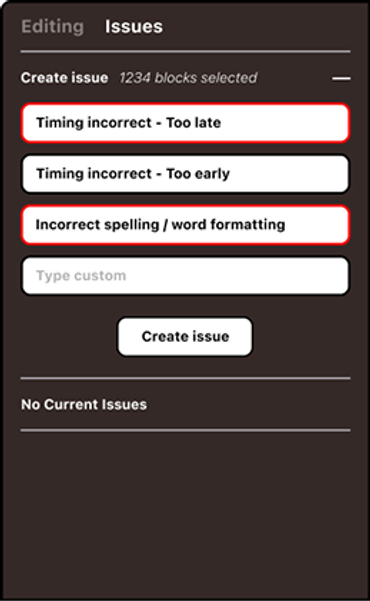
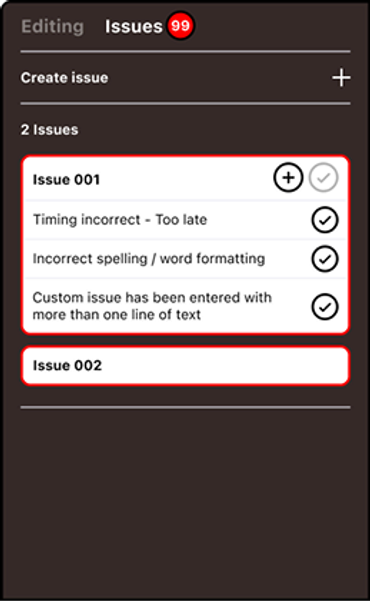
Our Head of Content - who runs and manages the content production team - wanted a last minute addition to improve the QA and review / feedback piece of the workflow. He asked if there could be a way for him to add feedback comments on any pieces of work he checked for errors so that he could communicate effectively with the team without the need to speak to them personally each time there was an issue.
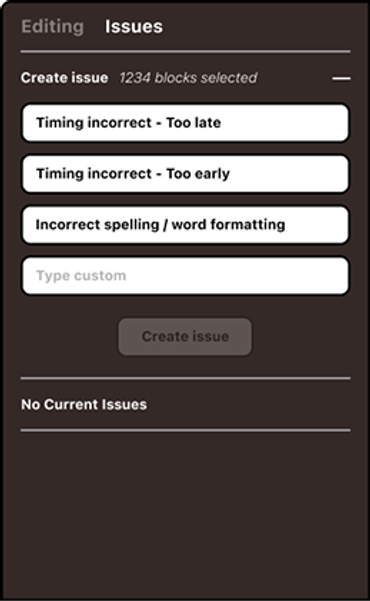
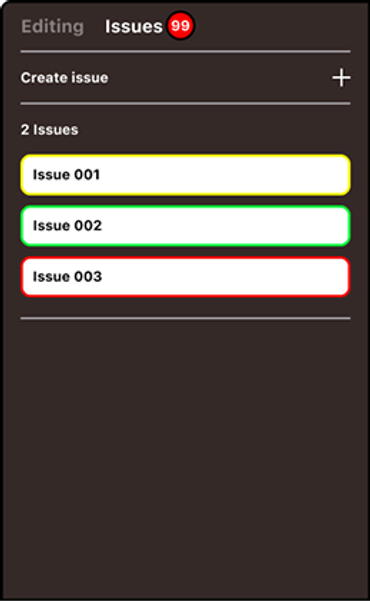
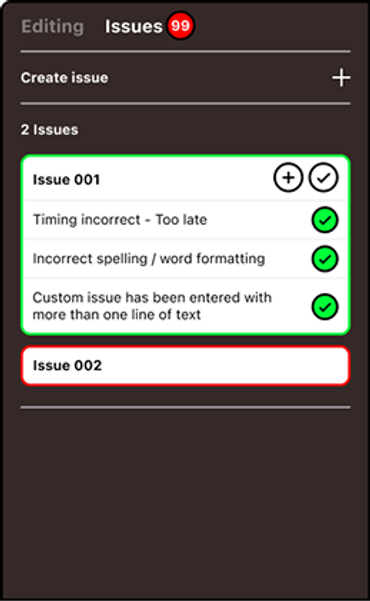
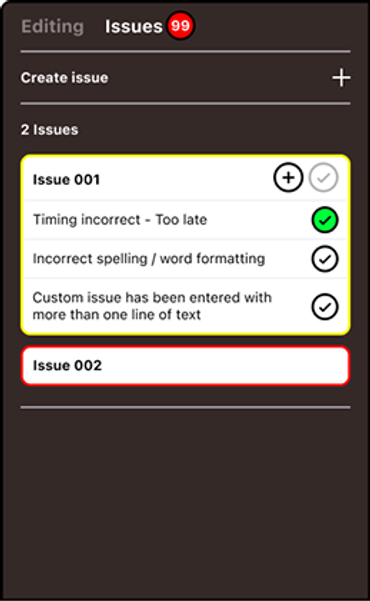
We went back to the ideation phase and looked at ways we could implement a feedback system into the CPT. Ultimately, this landed on being an addition to the right hand side navigation console. From here, the Head of Content - or whomever would be checking the work - would be able to flag any word which was mistimed or out of place.
The flagging would work by the user selecting a word and then selecting one and/or multiple issues with that word. This would add a flag or issue to the word, which would show up as a numerical notification on the project’s console. When the content creator re-opens their project, they would see that there have been flags placed and would go to the “issues” tab to investigate. Here they would see which flags have been set on any specific word, be able to move between all flags in the project and also be able to make flags as ‘complete’ and ready to be checked again.
Impact
Measuring the impact of the new product would be done by firstly measuring and comparing the output levels to the previous style of content creation, and secondly by testing the ease of use and barrier to entry with new starters in the content team who have little to no experience with using Adobe after effects.
Average weekly content output per team member using the previous programs : 5 - 6
Average weekly content output per team member using the new CPT : 20 - 25
As we can see, content output was drastically improved at a rate of around 5x compared to the previous output.
Two new starters began working with Sing King and both came from an apprenticeship program for 18-20 years old. They both have no experience with After Effects or video editing software and come from a drama/acting background. They were both started on the CPT software and within the first day were already producing usable content. With the previous systems, these new starters with no After Effects experience would have taken at least one full week to be onboarded and taught the methods for creating content on After Effects. With the new CPT software, they were able to jump straight into creation workflows and add to the team output.